The video guest book, without the booth

Video Guest Book for Weddings: Video Messages from Every Guest’s Own Phone

Put a QR code on the tables. Each guest scans it and records a video message on their own phone: a toast, a memory, a laugh, and their faces, which you’ll watch again in ten years. No app, no account, no booth to rent.

  • From €19.90 once, for the whole wedding
  • No app or account
  • Works with no signal
  • Kept for 12 months
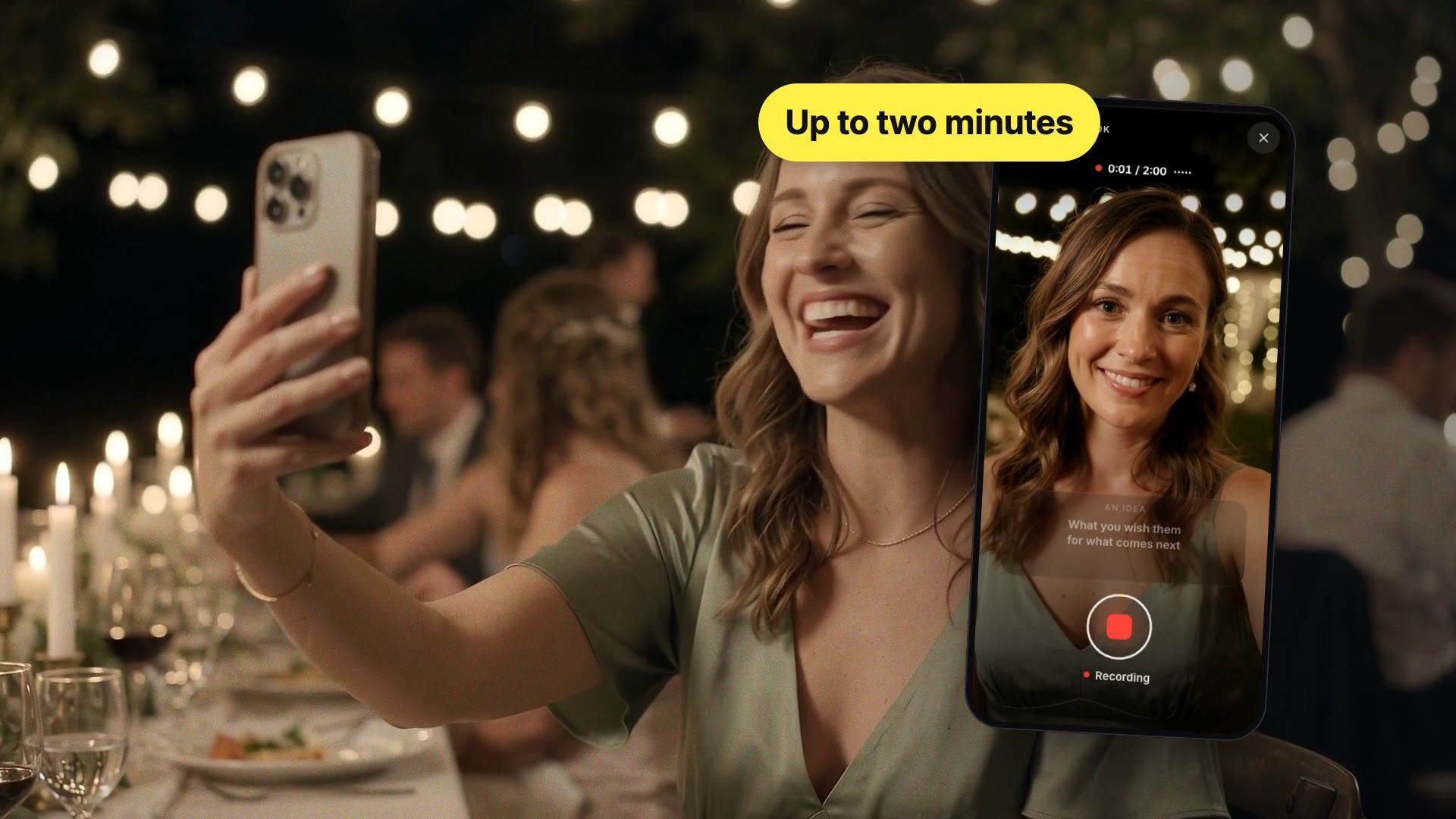
A guest in a sage green dress films herself with her phone at a wedding table under string lights; beside her, her recording screen: “Up to two minutes”

What Is a Video Guest Book?

A video guest book is a wedding guestbook where each guest leaves you a short video message instead of a written note: a toast, a memory, a wish. There are three ways to set one up: a video booth or kiosk rented for the night, a vintage-style phone with a built-in camera, or a QR code that turns every guest’s own phone into the camera. Film 36 is the third, with a tablet kiosk included for guests without a smartphone.

A Video Booth for 120 Guests Means a Two-Hour Line

Do the math: one minute per guest, plus the time to hesitate and start over. In front of a single screen, 120 guests is two hours without a break.

The rented booth: a great picture, one guest at a time

While one person talks to the camera, everyone else waits. At cocktail hour a line forms; after dinner, the dance floor drowns out the voices. Plenty of guests skip it, and they are often the ones you most wanted to see.
The QR code: 120 cameras already in their pockets

Every guest has a phone. They step outside for two minutes, during dessert or at the next-day brunch, and film themselves in peace. Everyone can record at the same time.

Still want a dedicated spot to record? The tablet kiosk is included. See below.

How a Video Guest Book Works from a Guest’s Own Phone

No app, no account: a first name, then the camera. This is exactly what your guests see.

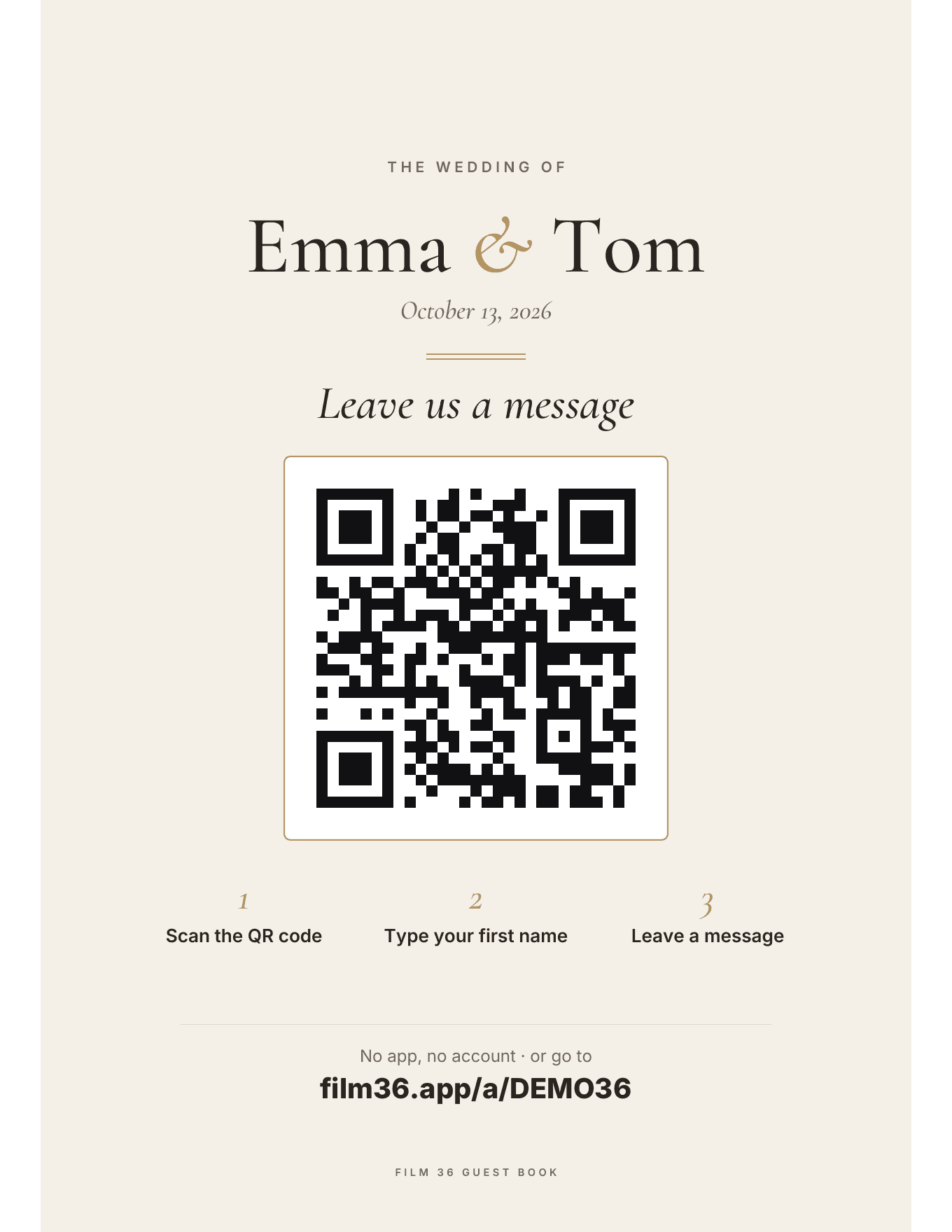
  1. The printable sign: “Leave us a message”, the QR code and three steps: scan the QR code, type your first name, leave a message

    1Scan the QR code, or open the link

    It’s on the welcome sign and the table cards, in the style of your wedding. Everyone else gets the link with a ready-made message. It all opens in the browser, on iPhone and Android.

    • QR code
    • Text
    • WhatsApp
    • Email
    • Copy link
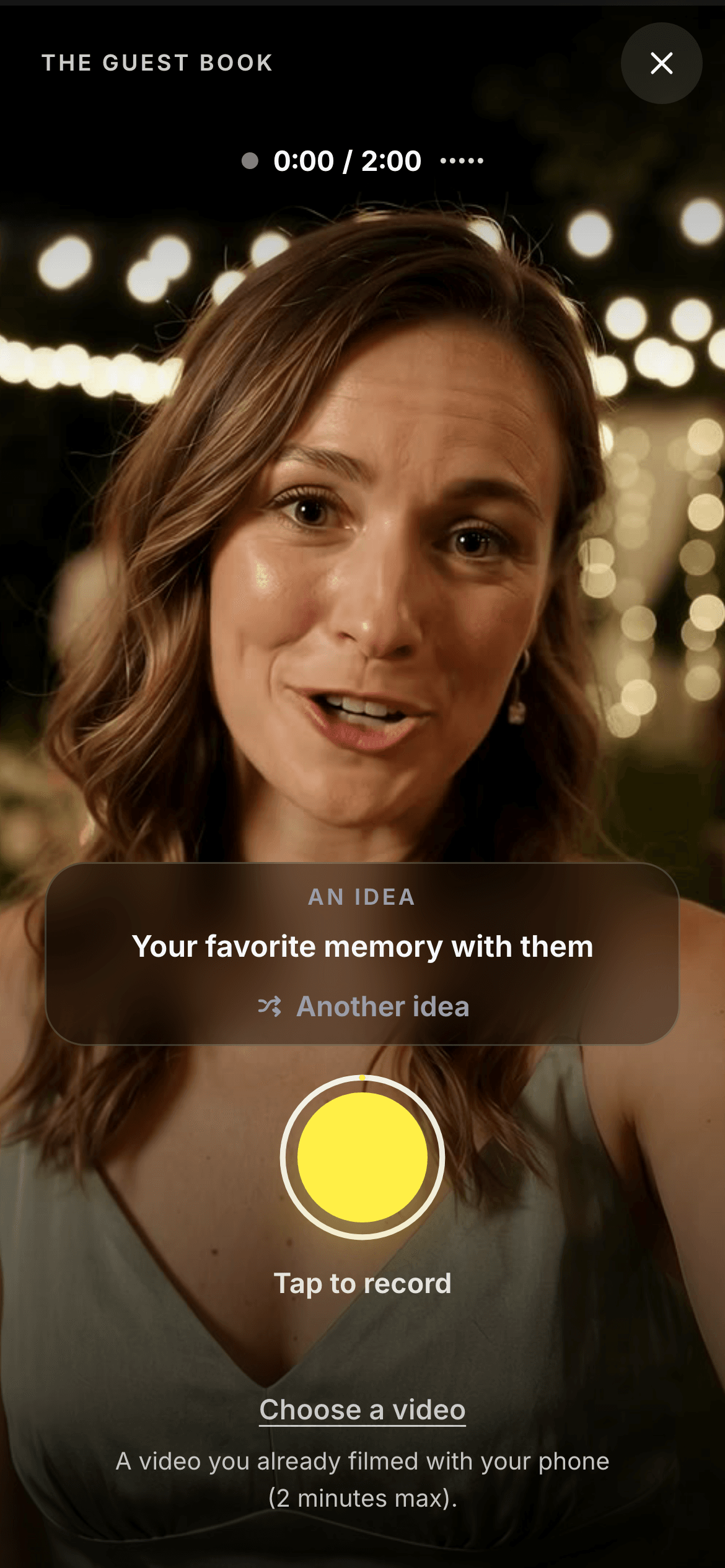
  2. The front camera open on a guest’s face, the prompt “Your favorite memory with them” and the big yellow record button

    2Record up to two minutes, with a prompt on screen

    The front camera turns on and guests see themselves like in a mirror. They tap, talk, and stop whenever they like: up to 2 minutes. For anyone stuck, a prompt appears and changes with a tap.

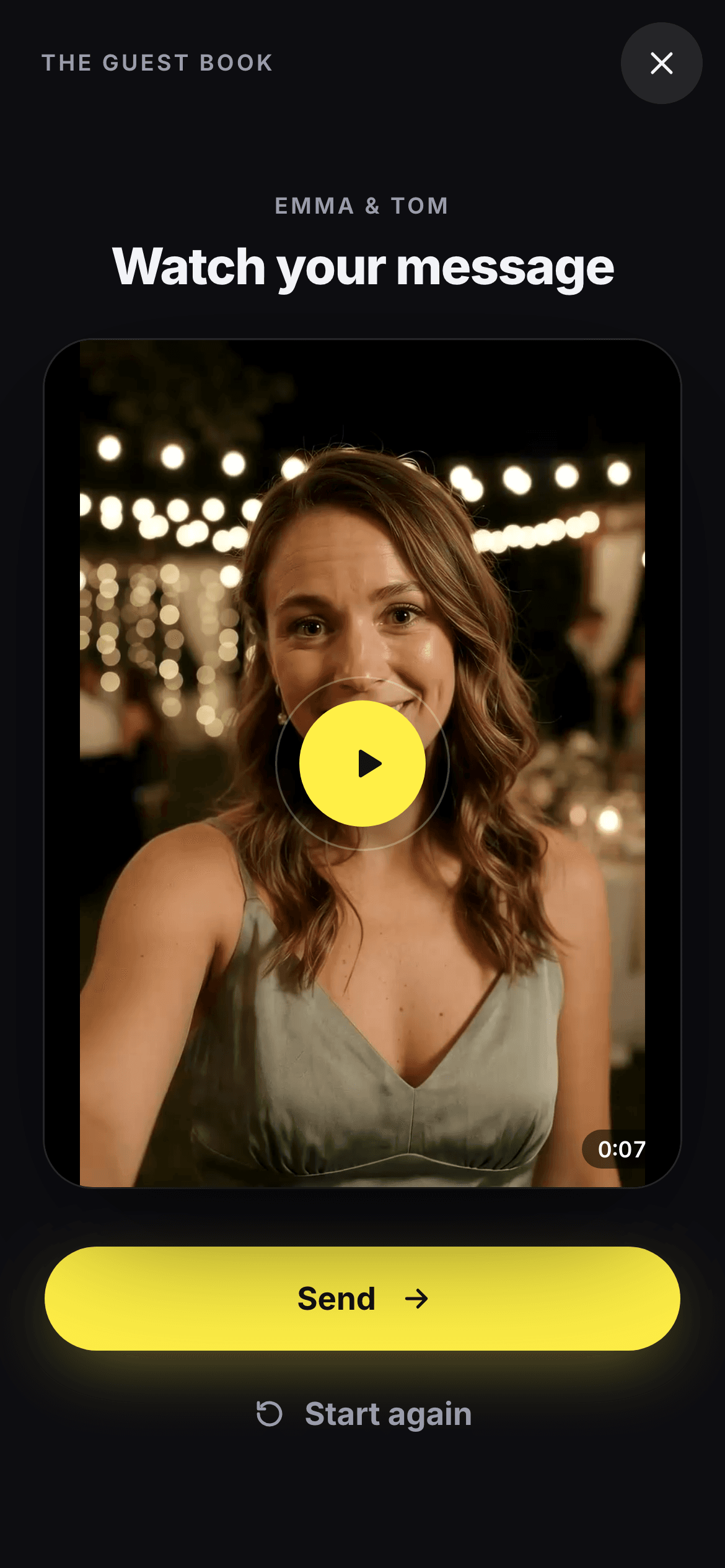
  3. The “Watch your message” screen: the guest’s video, the Send button and the Start again link

    3Watch it back, redo it, send

    Before sending, guests watch themselves. A fit of giggles, a fumbled word? They start again as many times as they want: only the version they send reaches you.

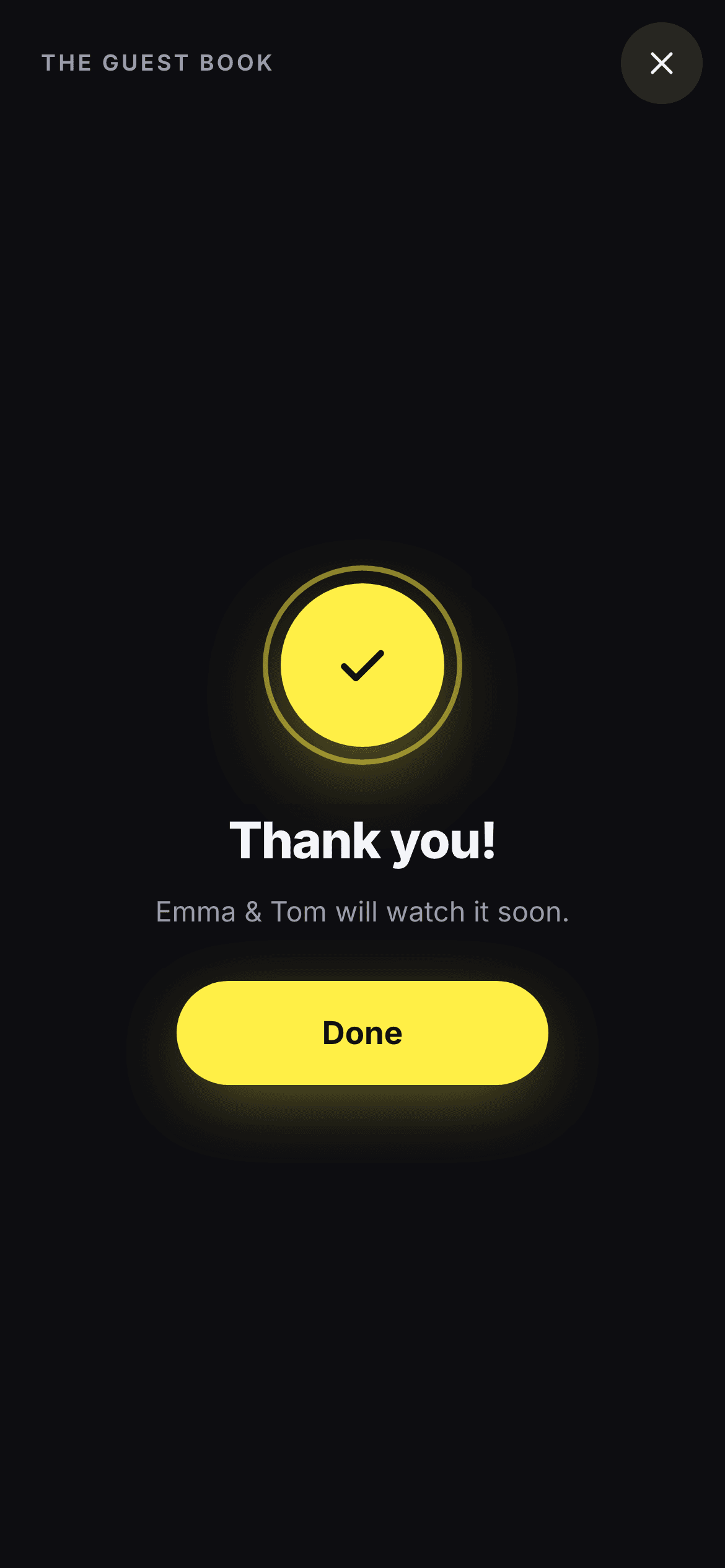
The final screen: “Thank you! Emma & Tom will watch it soon.”

A guest can’t make it? They record from home through the same link, before or after the wedding. Already filmed something? “Choose a video” sends it as is, if it’s 2 minutes or less.

A Video Weighs 40 Times More Than a Voice Message. No Signal? It Waits in the Phone

Voice message, 2 min
≈ 2 MB
Video message, 2 min in 1080p
≈ 75 MB

Two minutes of voice is about 2 MB. Two minutes of 1080p video is about 75 MB. On the patchy cell signal of a barn or a vineyard, that is exactly where uploads fail and messages get lost.

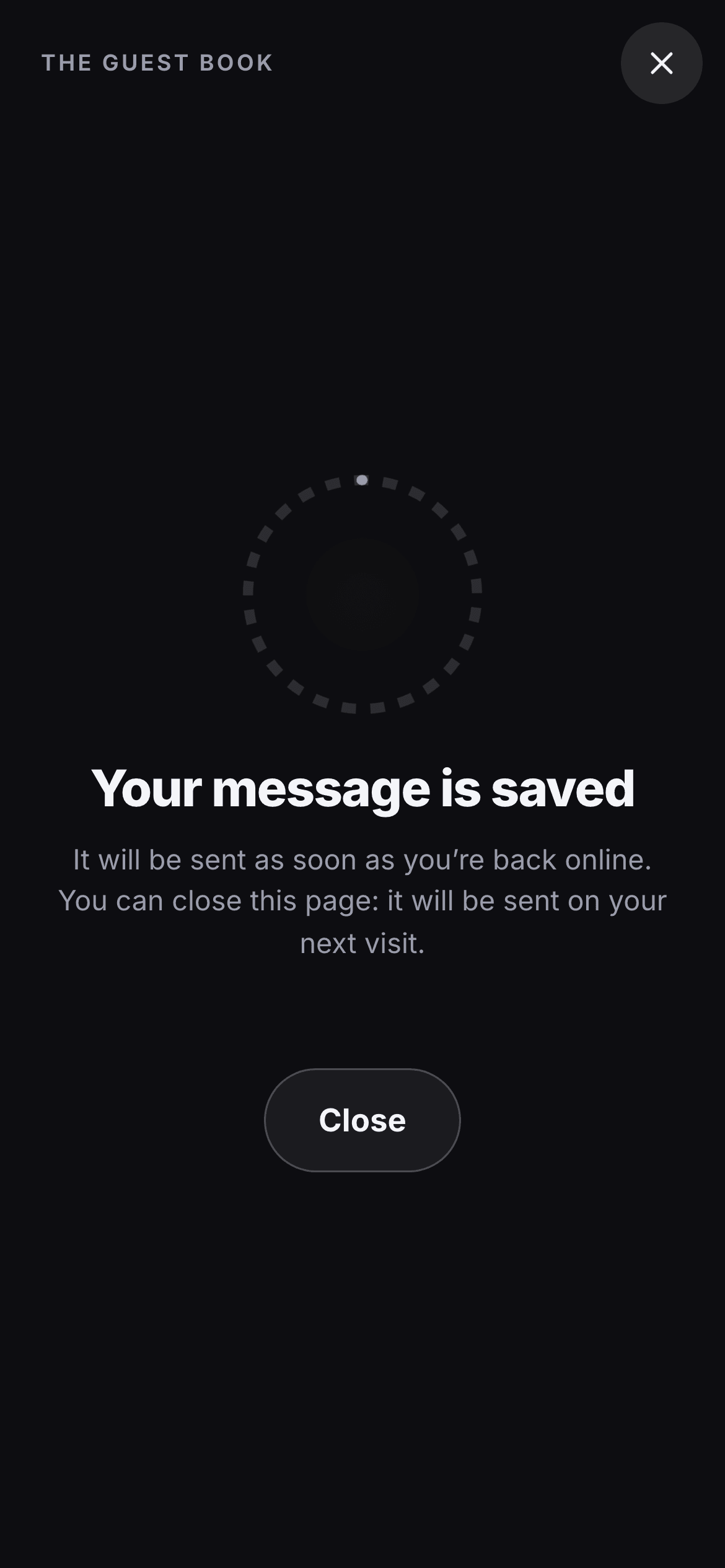
Here, nothing is lost. The recorded video stays in the guest’s phone and sends itself as soon as the signal is back: in the car, at the hotel, or on their next visit to the page. If the upload is cut off, it picks up where it stopped. The guest doesn’t have to do anything.

The screen “Your message is saved: it will be sent as soon as you’re back online.”
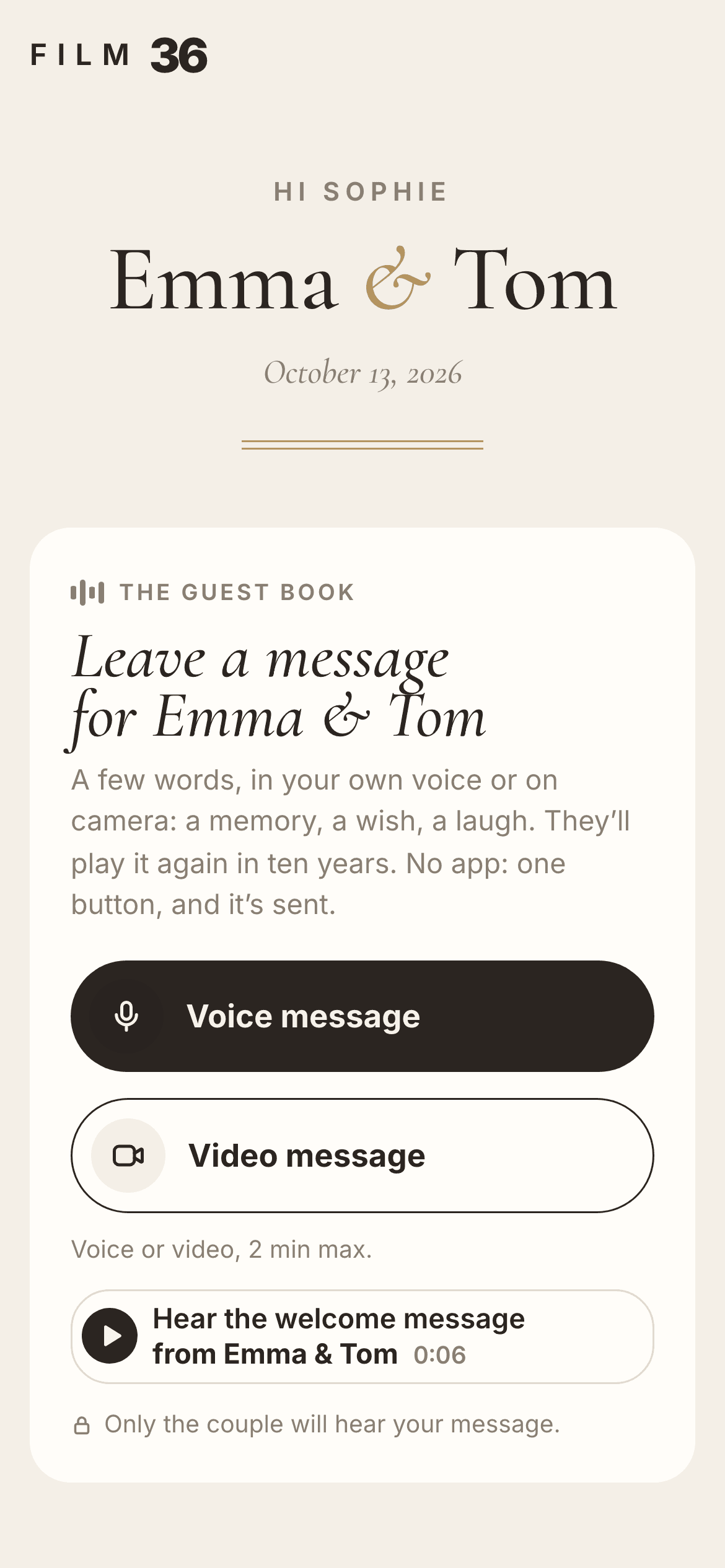
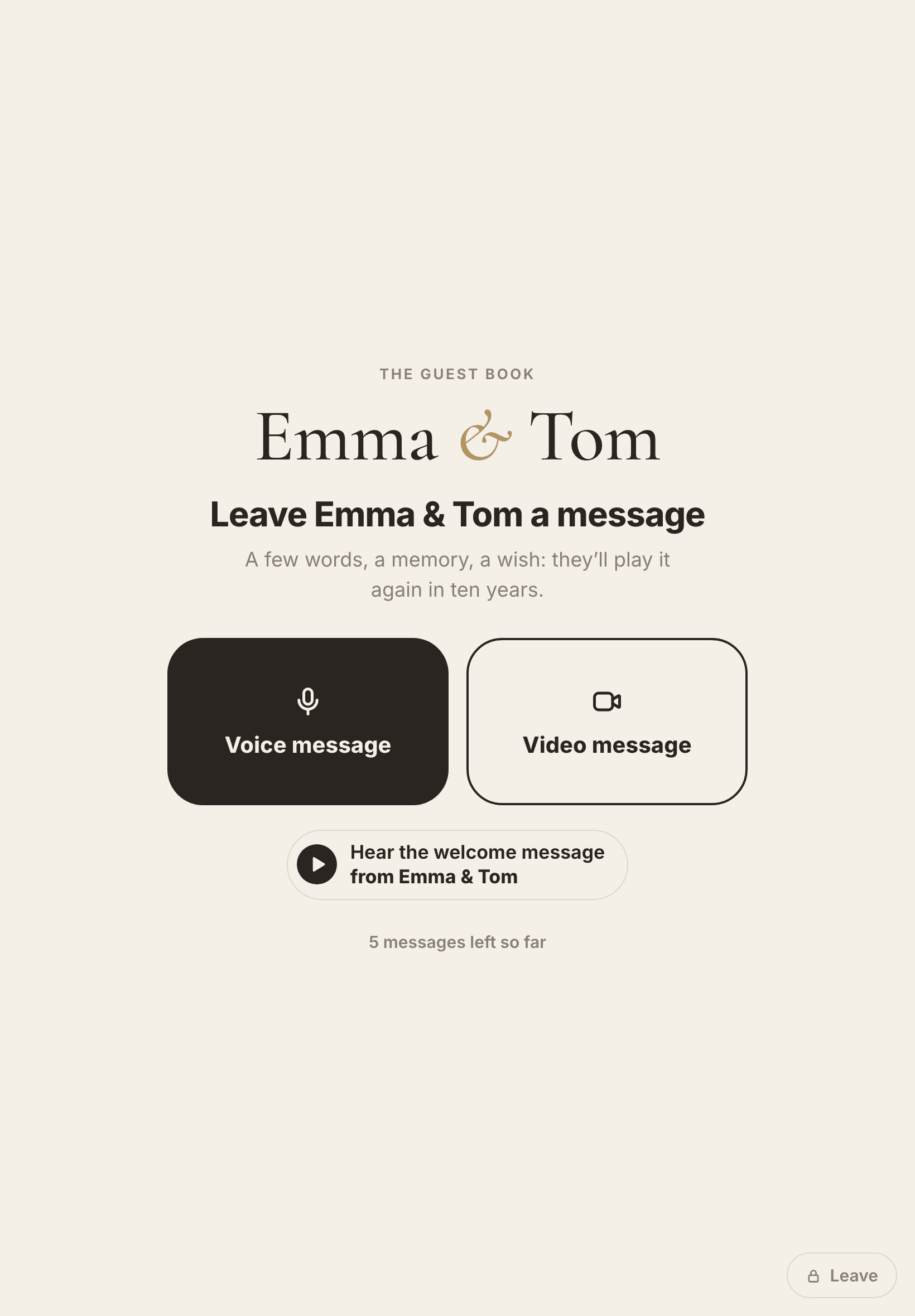
A guest’s page: “Leave a message for Emma & Tom”, the Voice message and Video message buttons, and the couple’s welcome message to play

Camera-Shy Guests Can Leave Their Voice Instead

Not everyone loves seeing themselves on screen. Booth companies know it, and suggest adding… a photo booth. Simpler: with the voice and video plan, each guest picks on their card, their voice or their face.

  • Two buttons, Voice message and Video message: nothing to explain.
  • A prompt appears for anyone who doesn’t know what to say, and changes with a tap.
  • Watch it back, start again: only the version they send reaches you.
  • Voice and video messages land in the same guest book.

Grandparents Without a Smartphone? Turn a Tablet into a Video Kiosk

For guests without a smartphone, or to keep a spot where people come to record: set an iPad or any tablet at the entrance or the bar. Guests record one after another, the first name is optional, and a 4-digit code stops anyone leaving the kiosk by mistake.

  • Voice message or Video message, just like on the phones.
  • The same guest book: kiosk messages arrive with all the others.
  • With no signal, messages wait in the tablet.
  • Nothing to rent: your tablet, or a friend’s.
The kiosk on a tablet: “Leave Emma & Tom a message”, with two big buttons, Voice message and Video message

After the Wedding: Watch Every Message, Download Every File, Make One Film

Videos land in your space during the reception. The next morning, you have a guest book that moves, laughs and raises a glass.

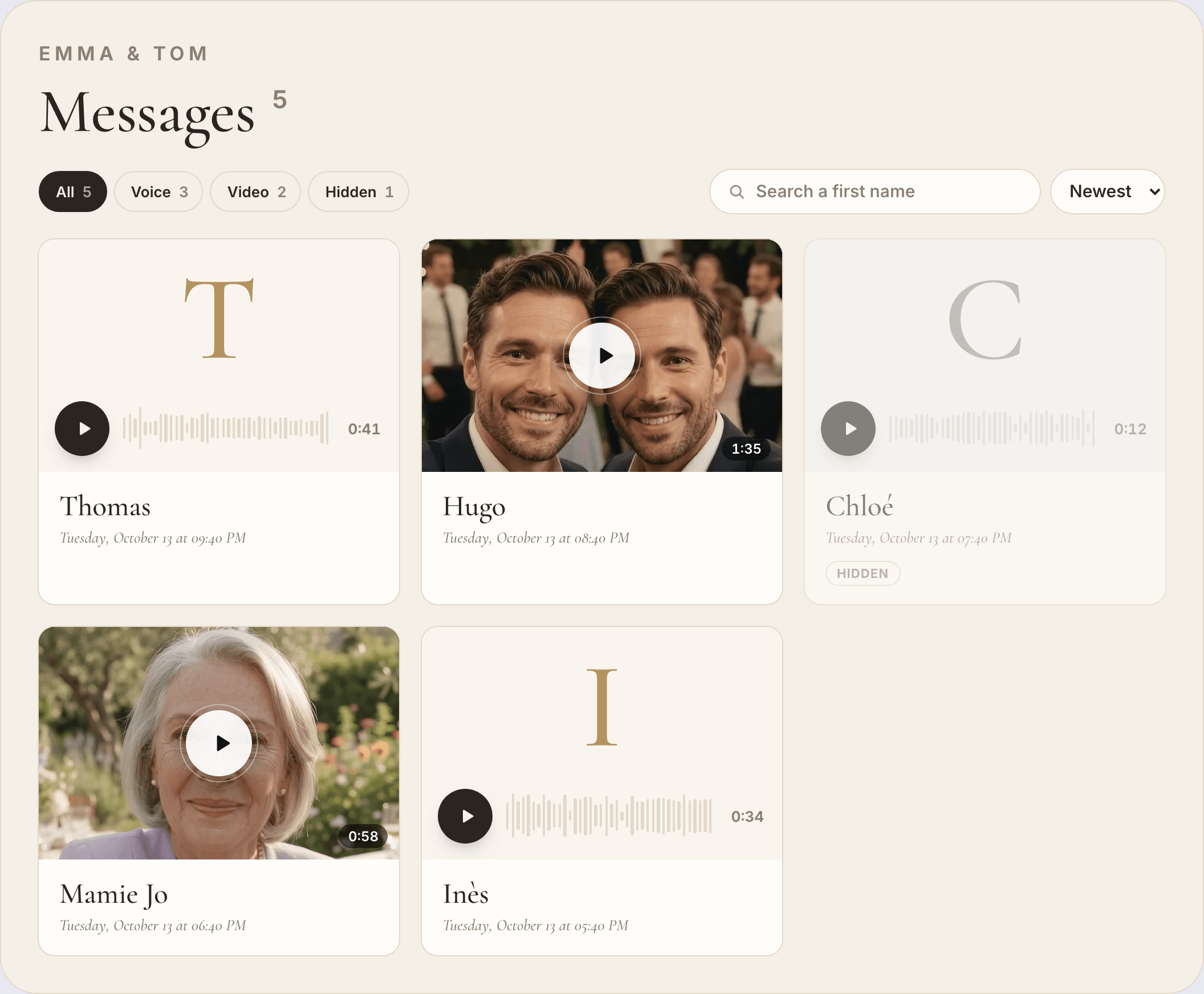
The couple’s space: “Messages”, the All, Voice, Video and Hidden filters, and a gallery where videos from Hugo and Mamie Jo sit next to voice messages from Thomas and Inès

Voice and video on the same wall

One card per guest, with their first name and the time of their message; for a video, a thumbnail of their face. Filter the videos, search a name, hide a message.

Theater mode, and “Play all”

A video opens full screen, on black. “Play all” runs every message, voice and video, first to last. The best time to watch: together, the next morning.

Every video named after the guest

Ordinary video files named like “2026-06-12 21h42 - Sophie”, one by one or all at once. They’re yours: keep them, copy them, edit them.

12 months to collect everything

Where many apps keep videos for 30 days or three months, yours stay in your space for a year. We warn you before anything is erased.

Making a film from your guests’ videos

Film 36 doesn’t edit a film for you: you keep every message whole, with no editor choosing for you. If you want a film, it takes one evening.

  1. Download everything at once: the time in each file name already puts them in the order of the night.
  2. Drop them into iMovie or CapCut, on your phone or computer, and keep ten seconds of each.
  3. Or hand the folder to your wedding videographer, who can weave them into your film.
  4. Save it for your first anniversary.
A video message open full screen in the couple’s space: Hugo and a friend raise their glasses of champagne to the camera
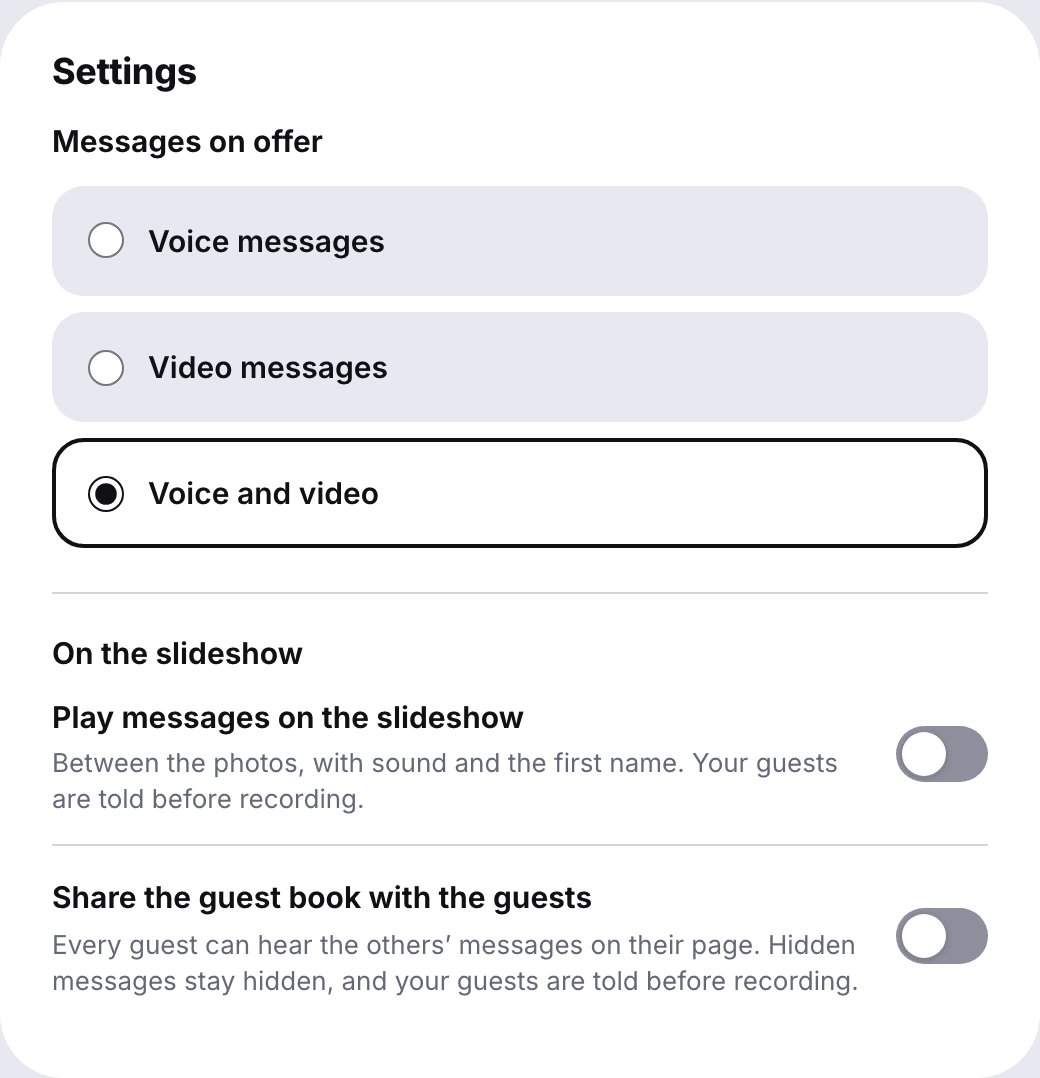
The guest book settings: which messages guests can leave (voice, video, or voice and video), then the options to play messages on the slideshow and to share the guest book with guests

Privacy: Only You Watch the Videos

A message filmed at 2 a.m. isn’t meant for everyone. By default, only the couple watches.

  • Before recording, guests see who their message is for.
  • Play the videos on the evening slideshow, or share the guest book with your guests: you decide, in your settings.
  • One message too many? Hide it in one click.
  • Voice, video, or both: you also choose what guests can leave.
  • Stored in the European Union, in Ireland: no ads, no resale, no AI training.

Video Booth Rental, Guest Book App or QR Code: What Each Costs

Three ways to collect your guests’ faces. Here is what changes, in practice.

Three ways to collect your guests’ faces. Here is what changes, in practice. Rented video boothVideo guestbook appFilm 36 (QR code)
Price $350 to $1,600 for the night, often with an attendantFree to $150, or a monthly subscription€19.90 for video, €24.90 for voice and video, once
Setup Delivery, setup, pickupNothingNothing: a QR code to print
Guests at the same time One, in front of the boothEveryone, on their own phoneEveryone, on their own phone, plus the kiosk
Length of a message Set by the companyFrom 30 s to 15 min, depending on the plan2 min
No signal Yes, recorded on the boothMost need a connection to uploadYes, the video waits in the phone
Voice or video, guest’s choice Depends on the modelSome appsYes, on each guest’s card
Guests who can’t come NoYesYes, same link, for 12 months
What you keep Raw clips by download or USB stick30 days to 1 year, depending on the plan12 months online, every file downloadable
Edited film Usually includedOften included, sometimes extraNo: your files, ready to edit

A booth still has real strengths: steady lighting and sound, and an edited film from many companies. If that’s what you want, rent it for the night, and let the QR code collect everyone else.

Still weighing other kinds of guest book? Here are 20 unique wedding guest book ideas, from voices to wood.

Prices checked on rental companies’ and apps’ pages on October 15, 2026.

20 Video Guest Book Questions That Get Guests Talking

A specific question gets people talking far more than “leave a message.” Put these on your sign or table cards: a prompt already appears on every guest’s screen.

  1. Raise your glass and give them a toast
  2. How did you meet them?
  3. Your favorite memory with them
  4. A story they’ve never heard
  5. Describe them in three words
  6. The moment from today you’ll remember
  7. Show them your table and introduce your neighbors
  8. What you thought the first time you saw them together
  9. Your advice for their 10th anniversary
  10. What you wish for them next
  11. The secret to a happy marriage, in your opinion
  12. Your best impression of one of them
  13. A song that makes you think of them (sing it!)
  14. Where will they be in twenty years? Your prediction
  15. The best date-night idea you know
  16. What makes them a great team
  17. Your advice for their first argument
  18. Your wish for their first home together
  19. The funniest thing either of them ever said to you
  20. Just a sweet word, nothing more

How Much Does the Film 36 Video Guest Book Cost?

One price, paid once. No subscription, no deposit, nothing to send back.

Video guest book

€19.90

once, for the whole wedding

Your guests’ faces, the welcome message, the kiosk.

  • Included: Video messages
  • Not included: Voice messages
  • Not included: Photo and video gallery from your guests, no limit
  • Included: Up to 500 messages, 2 min each
  • Included: Welcome message from the couple (30 s)
  • Included: Kiosk on a tablet
  • Included: QR code, sign and table cards to print
  • Included: Link by text, WhatsApp or email
  • Included: Works with no signal
  • Included: Watch all, download all
  • Included: Open and kept for 12 months

Guest book and photo album

€59

€64 with voice and video

Messages, photos and videos from your guests, on the same page.

  • Included: Video messages
  • Included: Voice messagesWith voice and video, €64
  • Included: Photo and video gallery from your guests, no limit
  • Included: Up to 500 messages, 2 min each
  • Included: Welcome message from the couple (30 s)
  • Included: Kiosk on a tablet
  • Included: QR code, sign and table cards to print
  • Included: Link by text, WhatsApp or email
  • Included: Works with no signal
  • Included: Watch all, download all
  • Included: Open and kept for 12 months

You can create your guest book, film yourself as a guest, and pay later.

Your questions before you start

Do guests need to download an app to leave a video message?

No. The QR code opens a page in the phone’s browser, on iPhone and Android. No app, no account: a first name is enough, then the guest allows the camera.

How long can each video message be, and how many can we get?

Up to 2 minutes each, and up to 500 messages. Guests watch their video before sending and can redo it as many times as they like. Each guest keeps one message: recording a new one replaces the previous one.

What if there’s no cell signal or Wi-Fi at the venue?

The video is kept in the guest’s phone and sends itself as soon as the signal returns, even if they close the page in the meantime. On the kiosk, messages wait in the tablet.

Can guests who can’t come leave a video message?

Yes. The link works from anywhere, before, during or after the wedding, for 12 months. Send it by text or WhatsApp to the cousin abroad or the grandparents who stayed home.

Do you edit the videos into one film?

No, not automatically. You get every video whole, named after the guest and the time of their message, ready to edit in iMovie or CapCut, or to hand to your videographer. “Play all” already runs them one after another.

Who can watch the videos, and can we hide one?

By default, only the two of you. You can choose to play them on the evening slideshow or share the guest book with your guests; guests are told before they record. Any message can be hidden in one click.

How long are the videos kept, and in what quality?

For 12 months; we email you 7 days and again 2 days before anything is erased. Videos are filmed with the front camera, in 1080p when the phone allows it, and download one by one or all at once.

Can we use an iPad as a video guest book kiosk?

Yes. Open kiosk mode on an iPad or an Android tablet and set it at the entrance or the bar: guests record one after another. A 4-digit code stops anyone leaving the kiosk by mistake.

How much does a video guest book cost?

Renting a video booth runs from about $350 to $1,600 for the night, often with an attendant and an edited film. Video guestbook apps go from free to $150, or charge a monthly fee. Film 36 costs €19.90 for video, or €24.90 for voice and video, once for the whole wedding.

Video or audio guest book: which should we choose?

Video keeps faces, gestures, the raised glass; voice puts camera-shy guests at ease. For €5 more, you don’t have to choose: each guest decides. All about voice alone: our audio guest book page.

Film 36 for the whole wedding

Their faces, in ten years

Create your video guest book in two minutes, record your welcome message, and film yourself as a guest before you pay.